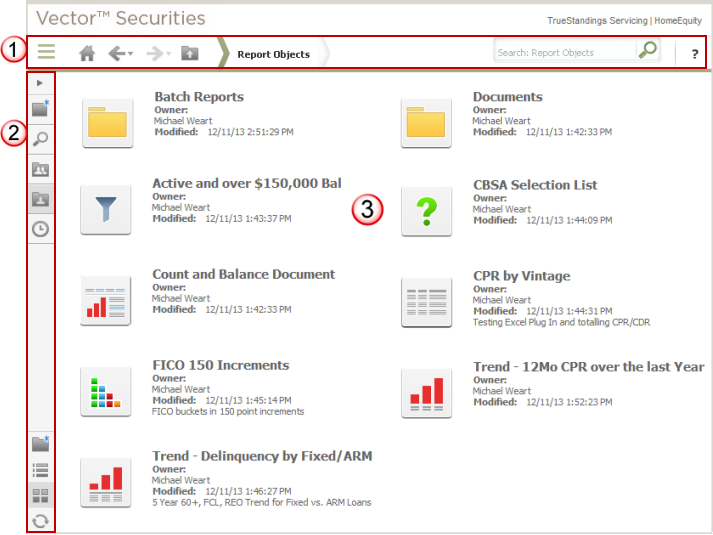
My Reports provides access to all reports, filters,
prompts and custom groups saved to the My Reports folder with your user
account. This page includes the standard
application toolbar  that
includes the drop
down task icon menu to provide access to the primary options within
Vector Securities.
This also includes the navigation
pane which may be toggled between expanded and collapsed
that
includes the drop
down task icon menu to provide access to the primary options within
Vector Securities.
This also includes the navigation
pane which may be toggled between expanded and collapsed  (this is currently shown in collapsed mode in the example below).
This page  displays folders first and then any reporting objects that were saved
directly into My Reports without a subfolder. When you save an object
to My Reports, you may choose to create a sub-folder to better organize
your personal objects. Objects saved to My Reports are only available
to your user account; if you wish to share with your user workgroup, you
must save these objects to the company shared folder in Shared Reports.
displays folders first and then any reporting objects that were saved
directly into My Reports without a subfolder. When you save an object
to My Reports, you may choose to create a sub-folder to better organize
your personal objects. Objects saved to My Reports are only available
to your user account; if you wish to share with your user workgroup, you
must save these objects to the company shared folder in Shared Reports.
Note: The screen shot below
is shown in icon view and includes at least one type of report object
(i.e., folder, report, filter, template, custom group, prompt and document).
When you view the My Reports page for your user account, the objects presented
will be those you have previously saved. This view may be toggled between
icon and list views using the option in the navigation
pane.