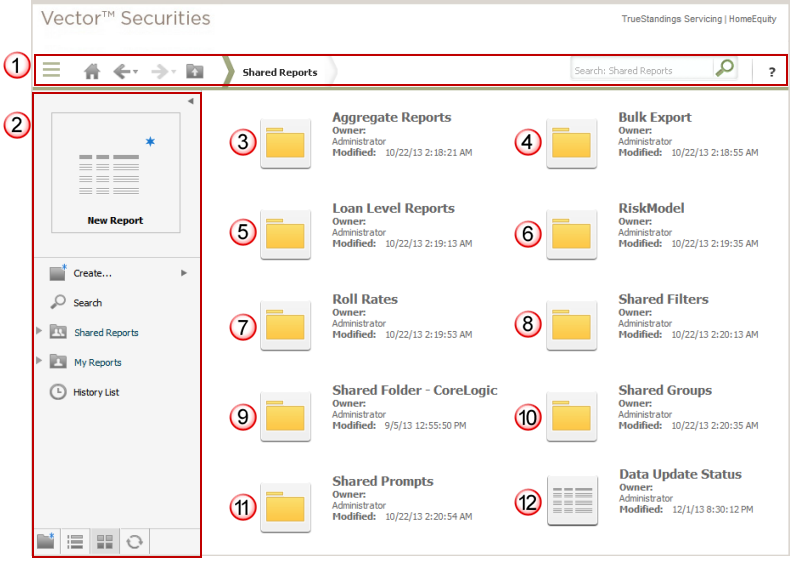
Shared Reports provides access to all predefined reports,
filters, prompts and custom groups available in Vector Securities.
This page includes the standard
application toolbar  that
includes the drop
down task icon menu to provide access to the primary options within
Vector Securities.
This also includes the navigation
pane which may be toggled between expanded and collapsed
that
includes the drop
down task icon menu to provide access to the primary options within
Vector Securities.
This also includes the navigation
pane which may be toggled between expanded and collapsed  (this is currently shown in expanded mode in the example below).
The Shared Reports folder options are divided into the following
subfolders:
· Aggregate
Reports folder  provides access
to the predefined aggregate level reports which are available to all users
and based on the most common analysis requests. You may run these as is,
or customize and save them to your personal My Reports folder.
provides access
to the predefined aggregate level reports which are available to all users
and based on the most common analysis requests. You may run these as is,
or customize and save them to your personal My Reports folder.
· Bulk
Export folder  provides access to the predefined
bulk export reports which deliver the output via an FTP server. When you
request one of these reports, you may select an option to receive an email
once the report is available for download.
provides access to the predefined
bulk export reports which deliver the output via an FTP server. When you
request one of these reports, you may select an option to receive an email
once the report is available for download.
· Loan
Level Reports folder  provides
access to the predefined loan level reports which are available to all
users and based on the most common analysis requests. You may run these
as is, or customize and save them to your personal My Reports folder.
provides
access to the predefined loan level reports which are available to all
users and based on the most common analysis requests. You may run these
as is, or customize and save them to your personal My Reports folder.
· RiskModel
folder  provides access to the reports formatted
for use as input files for the CoreLogic RiskModel application.
provides access to the reports formatted
for use as input files for the CoreLogic RiskModel application.
· Roll
Rates folder  provides access to the predefined
roll rate reports. You may run these as is, or customize and save them
to your personal My Reports folder.
provides access to the predefined
roll rate reports. You may run these as is, or customize and save them
to your personal My Reports folder.
· Shared
Filters folder  provides access to the predefined
standalone filters. You may add these as report filters to your new or
customized reports in Design mode.
provides access to the predefined
standalone filters. You may add these as report filters to your new or
customized reports in Design mode.
· Company
Shared folder  provides a location in Shared
Reports where members of your user workgroup may share custom reports,
filters, custom groups and documents. This folder will be named specific
to your company and will only be visible to those user accounts linked
to your user workgroup. No other users can view or access the report objects
in this folder.
provides a location in Shared
Reports where members of your user workgroup may share custom reports,
filters, custom groups and documents. This folder will be named specific
to your company and will only be visible to those user accounts linked
to your user workgroup. No other users can view or access the report objects
in this folder.
· Shared
Groups folder  provides access to predefined
custom groups that allow you to group loans based on FICO score, Original
LTV, ABX deals or PrimeX deals.
provides access to predefined
custom groups that allow you to group loans based on FICO score, Original
LTV, ABX deals or PrimeX deals.
· Shared
Prompts folder  provides the most commonly
used prompts to filter data based on your responses to the prompted attributes.
provides the most commonly
used prompts to filter data based on your responses to the prompted attributes.
· Data
Update Status report  provides a report
of the current status of the data updates throughout the month. Data is
updated on a daily basis throughout the month and noted as the "data
period in progress". You may use this report to monitor the progress
of the updates.
provides a report
of the current status of the data updates throughout the month. Data is
updated on a daily basis throughout the month and noted as the "data
period in progress". You may use this report to monitor the progress
of the updates.
Note: The screen shot below
is shown in icon view. This view may be toggled between icon and list
views using the option in the navigation
pane.